

Knowledge Base Feature
The "Knowledge Base" feature allows the AI to access and retrieve information from various content sources, such as website pages, textual content, or other structured inputs. This enables the AI to deliver accurate and context-aware answers based on the most up-to-date information.
Purpose
The Knowledge Base feature connects the AI to your organization’s existing help desk resources, ensuring responses are informed by relevant and current information. This connection enhances the AI's ability to provide accurate answers based on your website or other provided sources.
Key Features
-
Integration with Website Content
The AI can crawl different content types, such as:
-
Sitemap: Add a sitemap URL for the AI to crawl your entire website, including the knowledge base homepage and all related pages.
-
Links: Provide specific URLs for the AI to crawl only those pages, with the option to add multiple links.
-
Text: Paste plain text, useful for information that may not be available on your knowledge base website.
-
-
Automated Scanning
The AI scans the provided sources once a week for updates, ensuring the information remains current. Future updates may include configurable scan intervals.
-
Knowledge Base Status Check
Use the "Check Status" feature to view the scanned pages, including all articles added to the AI’s database. This allows you to track what content is accessible.
How to Add Your Site to the Knowledge Base
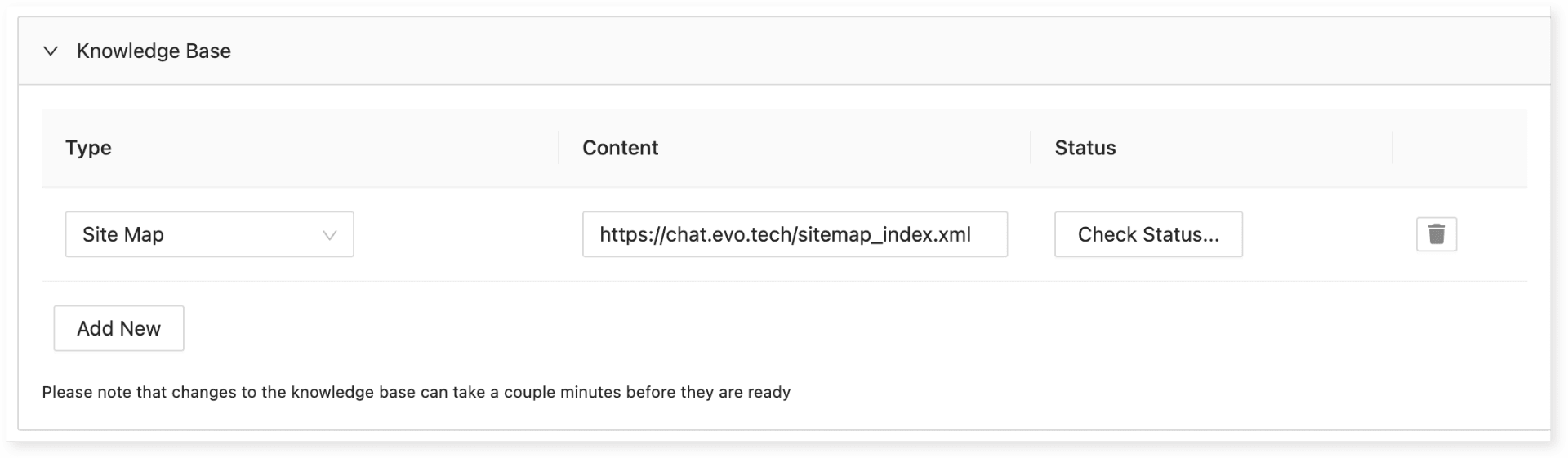
-
Access the Knowledge Base Section:
-
Open the Client AI tab.
-
Scroll down to the Knowledge Base section.
-
-
Choose a Content Type:
-
From the Type dropdown, select one of the following:
-
Sitemap URL: Allows full website crawling.
-
Specific Links: Crawls a single provided page.
-
Text Blocks: Add critical information manually if it's not available on your website.
-
-
-
Enter the Content:
- Provide the URL or text in the Content section.
-
Verify Connection (Optional):
- Click Check Status to ensure the AI can connect to the provided page.
-
Save Changes:
- Click Save to apply your updates.
How It Works
-
Provide Content Sources: Share a sitemap URL, specific links, or text blocks for the AI to access relevant information.
-
Automated Scanning: The AI scans these sources weekly to keep its knowledge updated.
-
Query Processing: For each question, the AI searches the knowledge base, retrieves relevant information, and provides an accurate response.
Use Case Example
-
Scenario: A user asks, "How do I add a new number to Evo Voice?"
-
The AI will:
-
Search the knowledge base for articles about adding new numbers.
-
Retrieve the most relevant article.
-
Generate an accurate, context-aware response based on that article.
-
-
Benefits
-
Up-to-Date Information
- Ensures the AI always references the latest content available on your website or from other provided sources.
-
Streamlined Support
- Reduces reliance on human intervention by allowing the AI to independently access detailed resources.
-
Comprehensive Answers
- The AI combines information from multiple sources to provide well-rounded, accurate responses.
Future Enhancements
-
Configurable Scan Intervals:
Future updates will allow businesses to configure scan intervals, enabling more frequent or less frequent updates based on needs.
-
Enhanced Analytics:
Upcoming features will provide analytics to track which knowledge base articles the AI uses most frequently, offering insights into user queries.
By leveraging the Knowledge Base feature, businesses can ensure their AI delivers informed and consistent support, leading to improved user satisfaction and operational efficiency.