

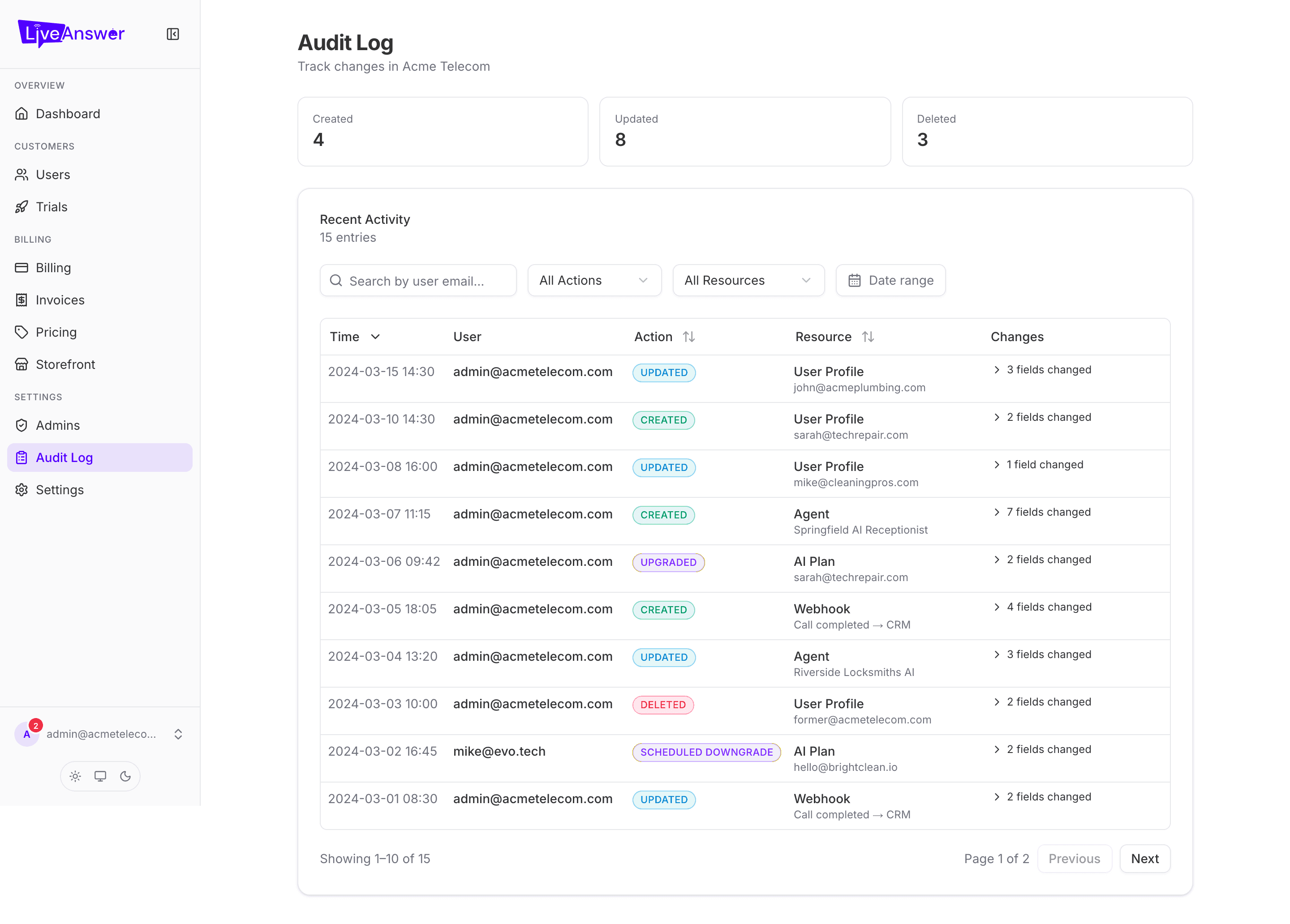
The Audit Log is a permanent record of every change made in your account — who did it, when, and exactly what changed. Use it to answer "who changed this?" and "what did this look like before?".
What gets recorded
Any change to a customer, agent, plan, team member, phone number, webhook, or your reseller settings. Each entry captures the before-and-after values, so nothing is lost.
Reading an entry
| Column | What it shows |
|---|---|
| Time | When it happened. |
| User | Who made the change. System means it was automatic — a renewal, a provisioning step, and so on. |
| Action | Created, Updated, or Deleted. Plan changes show a more specific label such as Upgraded or Scheduled Downgrade. |
| Resource | What was changed — a user profile, an agent, a plan — with the specific record named underneath. |
| Changes | A count of changed fields. Click it to expand and see each field with its old value (struck through) and new value. |
Finding what you're looking for
- Search by user email — everything one person did.
- All Actions — only creations, only updates, or only deletions.
- All Resources — only changes to agents, only to plans, and so on.
- From / To dates — a specific window.
The list is paged; use the controls at the bottom to move through it.
Two things worth knowing
- Entries are read-only. Nobody, including you, can edit or delete audit history.
- When you impersonate a customer, everything you do while impersonating is logged here under your name, not the customer's.