

The Knowledge Base is what your AI receptionist knows about your business beyond the basics: your service areas, pricing, policies, and the questions callers ask most. The more you put here, the fewer calls need a human.
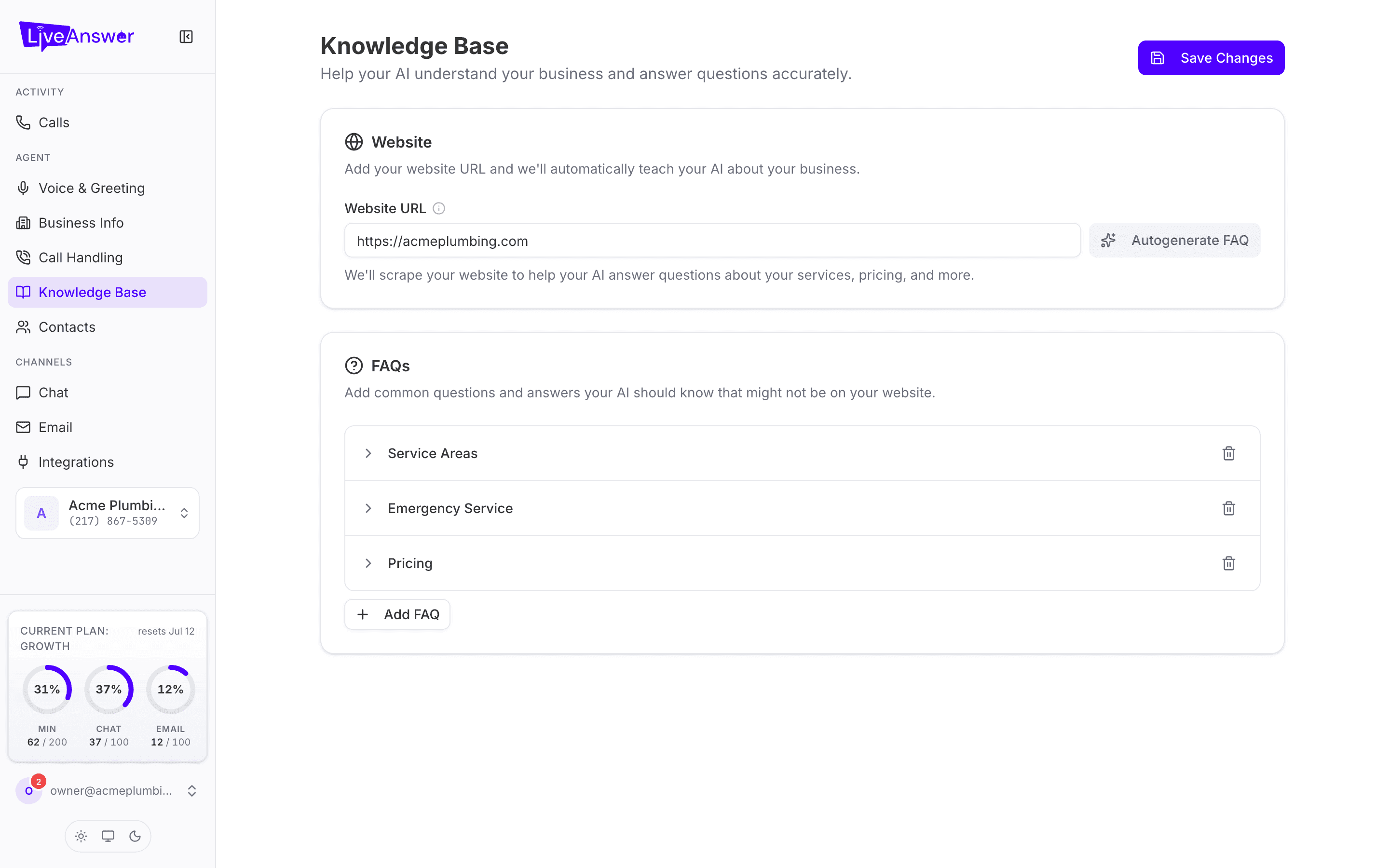
Build it automatically from your website
- Enter your Website URL.
- Click Autogenerate FAQ.
LiveAnswer reads your public pages and drafts a set of questions and answers. It's a starting point, not a finished product: read through the results and edit anything that's out of date or worded oddly.
Note: The site has to be publicly visible. Pages behind a login can't be read.
Adding and editing FAQs
Each FAQ is a question and the answer your AI should give. Click a question to expand it and edit.
- Click Add FAQ for a new one.
- Write answers the way you'd say them on the phone. They go straight to callers, so avoid jargon and keep them to a few sentences.
- Cover the questions that come up every day: hours, service areas, pricing, what to do in an emergency, how to pay.
Click Save Changes when you're done. Your AI uses the new answers from the next call.
Tips for good answers
- Be specific. "We cover Springfield and everywhere within 30 miles" beats "We cover the local area".
- Include the follow-up. If the answer usually leads to a booking, say so: "…and I can book that for you now if you'd like."
- Check the Calls page. Listen to calls where your AI couldn't answer, then add that question here.