

Voice & Greeting is where you give your AI receptionist its personality: a name, a greeting, a voice, and the right pronunciation for tricky words.
AI Identity
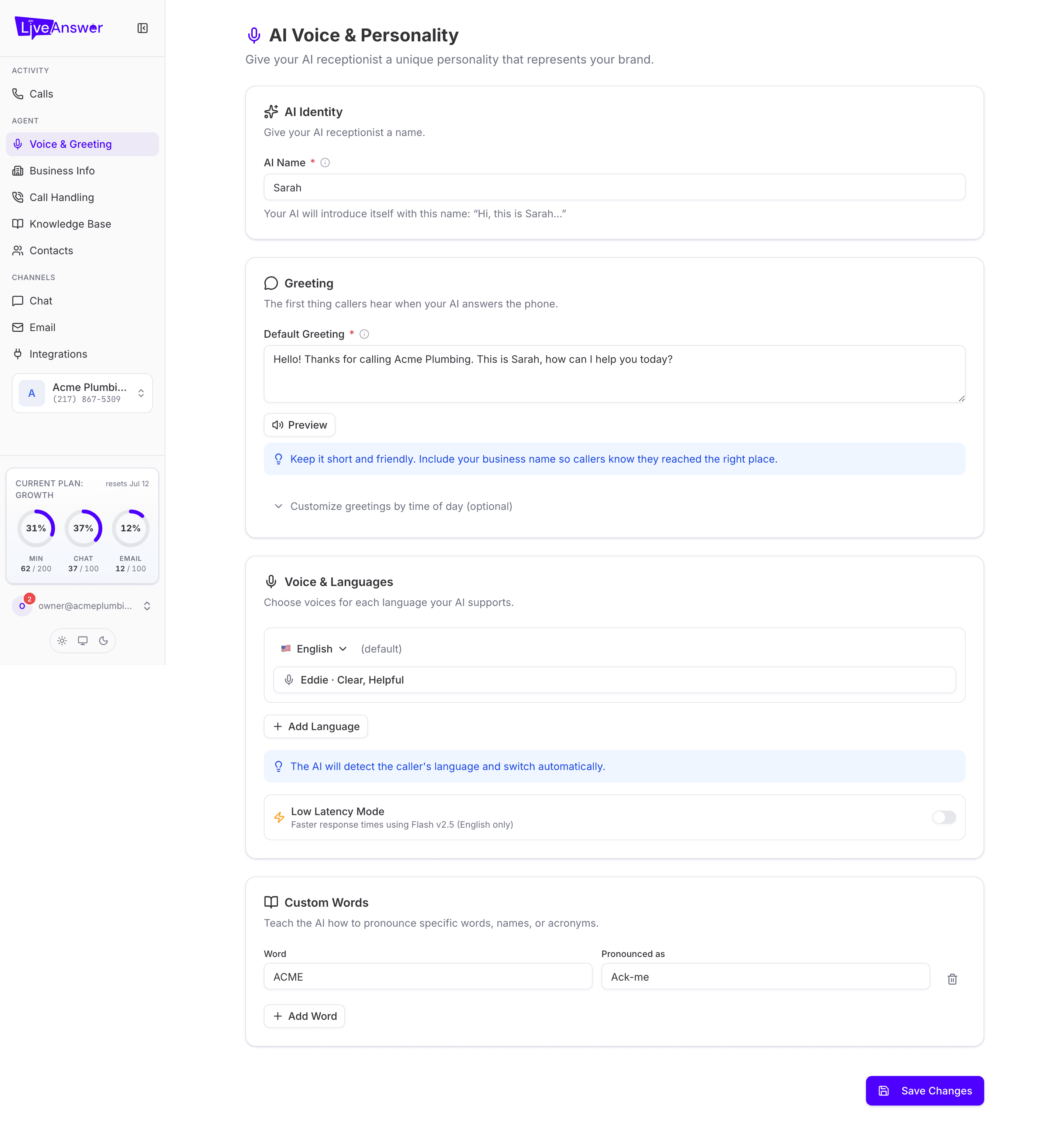
AI Name (required) — what your AI calls itself: "Hi, this is Sarah…". Pick something friendly and easy to say.
Greeting
Default Greeting (required) — the first thing callers hear. Keep it short and friendly, and include your business name so callers know they've reached the right place. For example: "Hello! Thanks for calling Acme Plumbing. This is Sarah, how can I help you today?"
Click Preview to hear it read aloud in the selected voice.
Greetings by time of day (optional)
Expand Customize greetings by time of day to set different greetings for morning, afternoon, and evening. Leave any of them blank to fall back to the default.
Voice & Languages
Your AI can speak more than one language and switches automatically when it detects the caller's language.
- Each language you add has its own voice. Click the voice field to hear samples and pick one.
- Add Language adds another language and voice.
- One language is marked (default); that's what your AI starts every call in.
Low Latency Mode — a switch that makes your AI respond faster. It works for English only. Turn it on if callers notice pauses; leave it off if you rely on other languages.
Custom Words
Teach your AI how to say names, brands, or acronyms it might otherwise mispronounce. Enter the Word as it's written and how it's Pronounced as, for example ACME → Ack-me. Click Add Word for more, or the bin icon to remove one.
Saving
Click Save Changes at the bottom. Required fields that are empty show a message underneath explaining what to add. Changes apply from the next call.
Heads up: After changing the voice or greeting, make a quick test call to hear it in context. Written greetings sometimes sound different spoken.