
The History page provides a summary of all call activities in your HostedSuite account. It is designed to give administrators and operators a detailed log of calls for tracking, accountability, and operational review.
You’ll be able to filter and export specific reports from this section, and for more advanced reporting features, visit the Reports section.
<br/>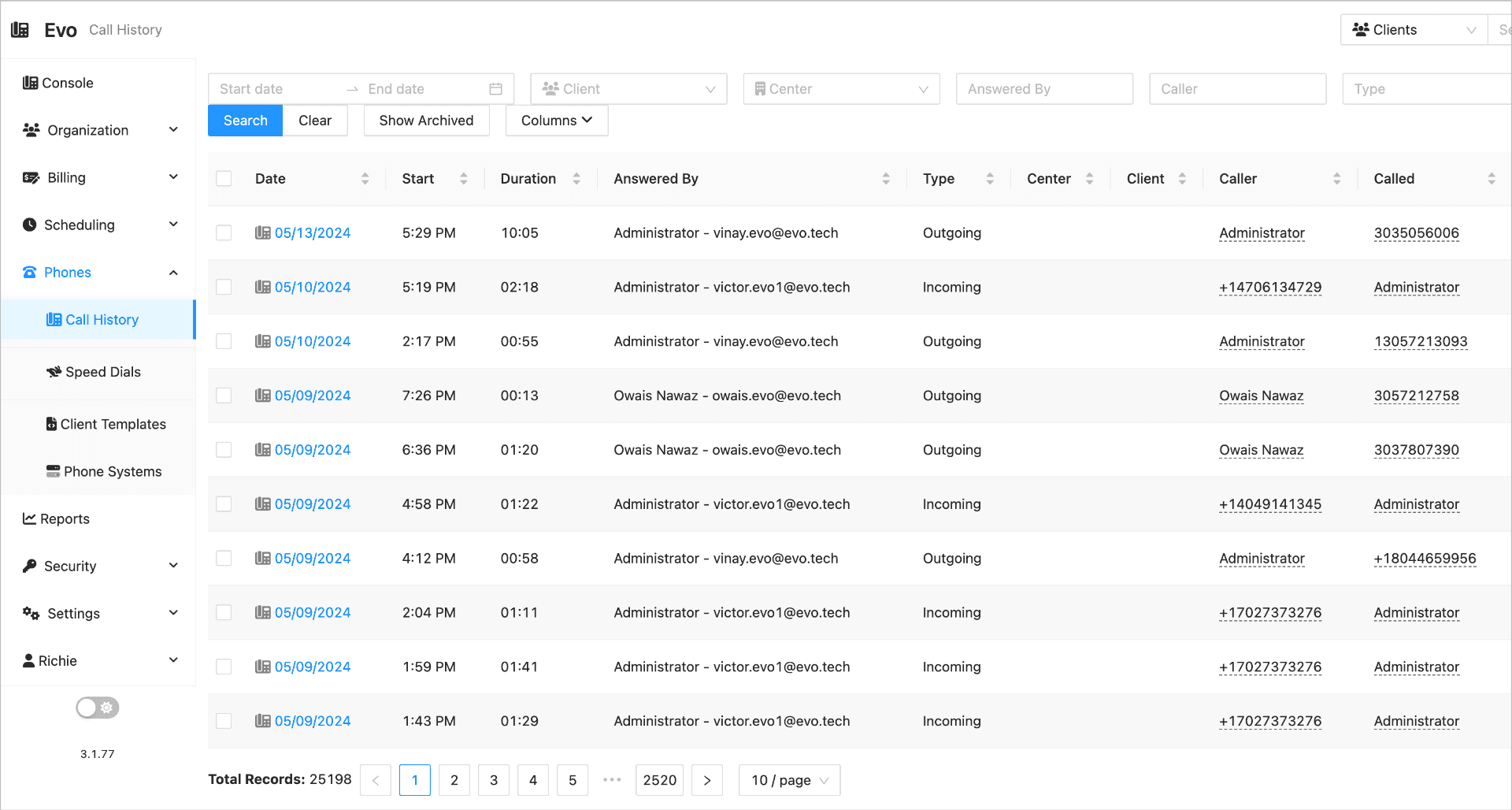
🧾 Call History Table Overview
Each entry in the call history includes a variety of details to help you understand what occurred during each interaction. Below is a breakdown of each column you may encounter:
| Column | Description |
|---|---|
| Date | The date when the call occurred. This column captures the exact date of each call activity in the account. |
| Start | The time when the call started. This field displays the precise start time of each call logged in the call history. |
| Duration | The total length of the call, including the time the call was active from start to end. |
| Answered By | The name or ID of the person or system that answered the call. This could include agents or automated systems that responded to the incoming call. |
| Type | The type of call (e.g., inbound, outbound, internal). This categorizes the call based on its origin or nature. |
| Center | The business center or location where the call was routed or originated. This helps track calls by geographic or operational unit. |
| Client | The client associated with the call. This links the call activity to the specific client account for reporting and analysis. |
| Caller | The person or number who initiated the call. May include contact name, phone number, or other identifying information. |
| Called | The person or extension who received the call. This may be an operator, a department, or another end user. |
| Category | The call classification or purpose (e.g., inquiry, support, sales). Helps understand the reason behind the communication. |
| Notes | Any additional notes or manual input recorded about the call. Useful for context, outcomes, or follow-up actions. |
| Form | The method or medium of the interaction, such as voice, video, or chat (if applicable). |
| Work | Actions or tasks completed as a result of the call, such as ticket creation, message logging, or follow-up instructions. |
If you need help with filtering or exporting data, or have questions about call tracking, please contact support or visit the Reports section for deeper analytics.